Wall-mounted fire alarm control panel:What is a wall-mounted fire alarm control panel and how does it work?
Q: What is a wall-mounted fire alarm control panel and how does it work?
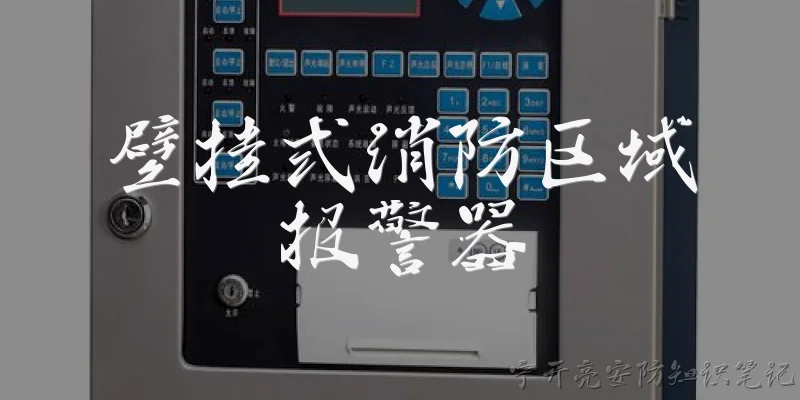
A: A wall-mounted fire alarm control panel is a compact, surface- or flush-mounted device that serves as the central hub of a fire detection and notification system. Unlike larger floor-standing cabinets, it is designed to be installed directly on a wall, making it ideal for small to medium-sized buildings such as retail shops, offices, clinics, and residential complexes where space is limited. The panel receives signals from initiating devices like smoke detectors, heat sensors, and manual call points. When an alarm condition is triggered, it activates notification appliances such as horns, strobes, or speakers, and can also transmit a signal to a monitoring station or building management system. Most modern wall-mounted panels feature microprocessor control, LED status indicators, and a keypad or touch interface for configuration. They typically operate on 24V DC or mains power with battery backup, ensuring continued operation during power outages. Some models support addressable loops for precise device identification, while conventional panels use zone-based wiring. Installation must comply with local fire codes, such as NFPA 72 or EN 54, and regular testing is required to maintain reliability.
Q: What are the key benefits of choosing a wall-mounted fire alarm control panel over a traditional cabinet model?
A: Wall-mounted fire alarm control panels offer several advantages over traditional floor-standing cabinets. First, they save valuable floor space, which is particularly important in small buildings or areas where square footage is at a premium. Second, they are easier to install because they require less conduit and wiring, and they can be mounted at eye level for convenient access. Third, their compact design often includes a built-in battery compartment and power supply, reducing clutter and installation time. From a maintenance perspective, wall-mounted panels are simpler to service since all components are accessible from the front, and they typically have fewer moving parts. They also tend to be more cost-effective for smaller systems, as they require less material and labor. Additionally, many modern wall-mounted panels support advanced features like remote monitoring, addressable device tracking, and integration with building automation systems. However, it is important to note that they may have a limited number of zones or points compared to larger cabinet models, so they are best suited for buildings with lower device counts. For large facilities, a hybrid approach may be needed, but for many small to mid-sized applications, a wall-mounted panel is the optimal choice.
Q: How do I select the right wall-mounted fire alarm control panel for my building?
A: Selecting the right wall-mounted fire alarm control panel involves several key considerations. First, determine the size and complexity of your building: count the number of detection devices and notification appliances you need. Conventional panels are suitable for small systems with up to a few zones, while addressable panels are better for larger or more complex layouts because they pinpoint the exact location of an alarm. Second, check local fire codes and standards. In the US, NFPA 72 governs installation; in Europe, EN 54 applies. Ensure the panel is listed or approved by a recognized testing laboratory, such as UL or VdS. Third, consider the power requirements and battery backup duration—typically 24 hours of standby plus 5 minutes of alarm. Fourth, evaluate the panel's connectivity options: does it support remote monitoring, Ethernet, or cellular communication? Fifth, think about expandability. Even if your current needs are modest, future renovations may require additional zones or devices. Finally, assess the user interface. A clear display and intuitive keypad reduce training time and errors during emergencies. Also, check compatibility with existing devices if you are upgrading. Consulting a licensed fire protection engineer or installer is highly recommended to ensure compliance and optimal performance.
Dialogue about
Common scenarios of "Wall-mounted fire alarm control panel"
【Technician】 Good morning, I'm here to inspect the wall-mounted fire alarm control panel. Can you show me where it's located?
【Building Manager】 Certainly, it's right over here in the main lobby, next to the security desk. Let me unlock the cabinet for you.
【Technician】 Thank you. I see the panel is a model FX-2000. I'll start by checking the power indicators. The green AC power light is on, and the battery light is off, which is good.
【Building Manager】 That sounds promising. We haven't had any issues recently, but it's good to have it checked regularly.
【Technician】 Absolutely. Now I'll test the alarm activation. I'll press the test button. You should hear the alarm sound and see the red alarm light flash.
【Building Manager】 Okay, go ahead. I'm ready.
【Technician】 Testing now. (Presses button) Do you hear the alarm? It should be a loud continuous sound.
【Building Manager】 Yes, I hear it. It's quite loud. The red light is flashing too.
【Technician】 Great. Now I'll silence the alarm and reset the panel. (Presses reset button) The alarm should stop, and the system should return to normal.
【Building Manager】 The alarm stopped. The panel lights are back to green. That was quick.
【Technician】 Yes, everything seems to be functioning correctly. Next, I'll check the battery backup. I'll simulate a power failure by turning off the AC breaker.
【Building Manager】 Is that safe? Will the system still work?
【Technician】 Yes, it's safe. The battery should take over and keep the panel operational. I'll turn off the breaker now. (Turns off breaker) The panel should switch to battery power.
【Building Manager】 I see the green AC light is off, and a yellow trouble light is on. Is that normal?
【Technician】 Yes, that indicates the panel is running on battery. It's normal during a power failure. I'll turn the breaker back on. (Turns on breaker) The panel should return to AC power and the trouble light should clear.
【Building Manager】 The trouble light went off. Good. So the battery is working?
【Technician】 Yes, the battery is providing backup power. However, I noticed the battery voltage is slightly low. It might need replacement soon. I'll note it in my report.
【Building Manager】 How soon should we replace it?
【Technician】 I'd recommend replacing it within the next month to ensure reliable backup. Also, I'll clean the panel and check all connections. Everything else looks good.
【Building Manager】 Thank you for the thorough inspection. I'll order a new battery and schedule a replacement. Can you send me the report?