What do the IPC port and LAN port on a PoE switch mean?:What is the difference between the IPC port and the LAN port on a PoE switch?
Q: What is the difference between the IPC port and the LAN port on a PoE switch?
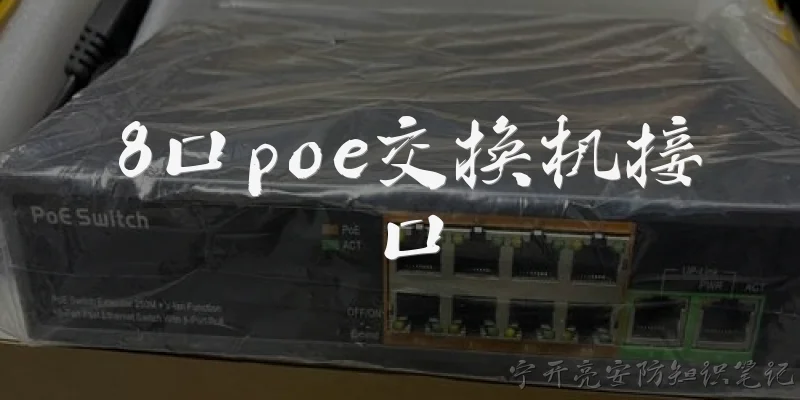
A: On a PoE switch, the IPC port and LAN port serve different roles. The IPC port is specifically designed to connect IP cameras (IPC stands for IP Camera). It typically provides Power over Ethernet (PoE) to power the camera directly through the Ethernet cable, eliminating the need for a separate power adapter. These ports often have higher power budgets and may support long-distance transmission modes. In contrast, the LAN port is a general-purpose Ethernet port for connecting other network devices such as computers, routers, or additional switches. While some LAN ports may also support PoE, they are not optimized for camera-specific features like extended reach or surge protection. Essentially, the IPC port is a specialized PoE port for surveillance devices, while the LAN port is for standard network connectivity. Knowing this distinction helps in proper cabling and avoiding damage to non-PoE devices.
Q: Can I connect a computer to the IPC port of a PoE switch?
A: Technically, you can connect a computer to an IPC port on a PoE switch, but it is not recommended without caution. The IPC port supplies PoE power, which could potentially damage a non-PoE device like a standard computer's Ethernet port if the port does not support auto-negotiation or if the computer lacks PoE protection. Many modern PoE switches do perform handshaking to detect whether a device needs power, so a computer would not receive power. However, some older or cheaper switches may force power unconditionally, risking damage. Additionally, the IPC port might be configured for a different VLAN or network segment optimized for camera traffic, so the computer may not get proper network access. For safe operation, connect computers to LAN ports instead. If you must use an IPC port, verify that the switch supports IEEE 802.3af/at auto-detection and that your computer can handle unexpected power. When in doubt, use a PoE injector or a non-PoE switch for non-camera devices.
Q: Why do some PoE switches have separate IPC and LAN ports?
A: Separate IPC and LAN ports on a PoE switch are designed to simplify and secure IP camera deployments. The IPC ports are grouped together and often support features like long-range PoE (up to 250 meters) and watchdog functionality to automatically reboot unresponsive cameras. They may also be isolated from the LAN ports at the physical or logical level, preventing camera traffic from flooding the general network. This separation enhances security by keeping surveillance data on a dedicated segment, reducing the risk of unauthorized access. Meanwhile, the LAN ports connect to the rest of the network, such as NVRs, routers, or workstations. This design allows installers to quickly identify where to plug in cameras without worrying about power budgets or VLAN configurations. It also helps in troubleshooting: if a camera fails, you know it's on an IPC port. For home or small business users, this separation makes setup intuitive. Overall, the split reflects a purpose-built switch for video surveillance, balancing performance, safety, and ease of use.

Dialogue about
Common scenarios of "What do the IPC port and LAN port on a PoE switch mean?"
【User】 Hi, I just got a PoE switch and I see it has an IPC port and a LAN port. What do these mean?
【Assistant】 Great question! The IPC port is typically used to connect IP cameras (IPC stands for IP Camera). It often provides PoE power and network connectivity specifically for cameras. The LAN port is a general network port for connecting to your local area network, like a router or other devices.
【User】 So the IPC port is just for cameras? Can I plug a computer into it?
【Assistant】 Yes, the IPC port is designed for IP cameras, but it's essentially a standard Ethernet port with PoE. You could plug a computer into it if the computer supports PoE or if you use a PoE splitter, but it's not recommended because the port might be on a separate VLAN or have specific settings for cameras.
【User】 What do you mean by separate VLAN? Does that affect how the ports work?
【Assistant】 Many PoE switches with dedicated IPC ports isolate those ports from the LAN ports for security and performance. This means devices on IPC ports can't directly communicate with devices on LAN ports unless the switch is configured otherwise. It helps keep camera traffic separate from regular network traffic.
【User】 So if I have multiple cameras, I should connect them all to IPC ports?
【Assistant】 Exactly. The IPC ports are meant for your cameras. They often provide power and data over a single cable, simplifying installation. Just make sure your cameras are PoE-compatible or use a PoE injector.
【User】 What about the LAN port? Can I connect multiple devices there?
【Assistant】 The LAN port is usually an uplink port to connect the switch to your main network, like a router or another switch. Some switches have multiple LAN ports, allowing you to connect other devices like computers, printers, or access points.
【User】 So the LAN port doesn't provide PoE?
【Assistant】 It depends on the switch. Some PoE switches have PoE on all ports, including LAN ports, while others only have PoE on specific ports (like IPC ports). Check your switch's specifications to see which ports support PoE.
【User】 How can I tell which ports are which? They look the same.
【Assistant】 They might look identical physically, but they are usually labeled. IPC ports might be grouped together or have a different color. Also, the switch's manual or web interface will show which ports are which and their capabilities.
【User】 If I plug a camera into a LAN port, will it work?
【Assistant】 It might work if the LAN port provides PoE, but if not, the camera won't power on. Also, network settings might need adjustment. It's best to use the designated IPC ports for cameras to ensure proper functionality.
【User】 What if I want to connect a non-PoE device to an IPC port?
【Assistant】 You can, but you'll need a PoE splitter to separate power and data, or you risk damaging the device if it's not PoE-compatible. Always check device compatibility.
【User】 Thanks! That clears things up. So IPC ports are for cameras, LAN ports for network uplink and other devices.
【Assistant】 You're welcome! That's a good summary. Just remember to check your switch's documentation for specific port capabilities and PoE support. Happy networking!