
Access control board RS485:What is an RS485 access control board and how does it work?
Q: What is an RS485 access control board and how does it work?
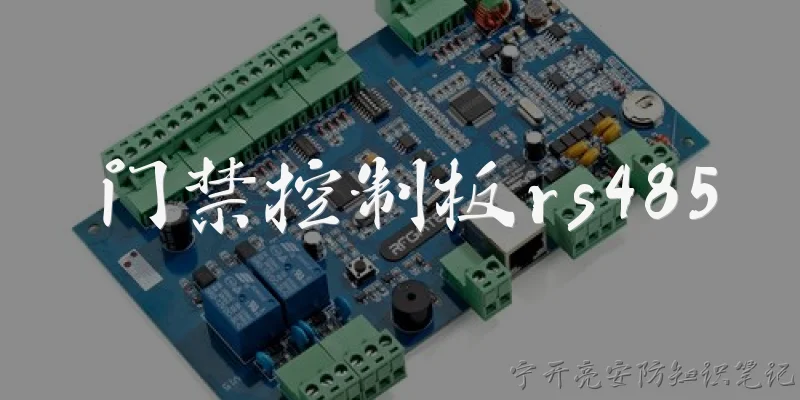
A: An RS485 access control board is a hardware controller that manages entry and exit points using the RS485 serial communication standard. It acts as the central brain for card readers, keypads, biometric devices, and electronic locks. RS485 is a differential signaling protocol that transmits data over twisted-pair cables, allowing reliable communication over distances up to 1,200 meters and supporting up to 32 devices on a single bus (or more with repeaters). In a typical setup, the board connects to multiple readers and sensors via a daisy-chain or multi-drop wiring topology. When a credential is presented, the reader sends data to the board over RS485, and the board verifies it against a local database or forwards it to a host PC or cloud server. If authorized, it triggers a relay to unlock a door, turnstile, or gate. Because RS485 is noise-immune and supports long cable runs, these boards are ideal for multi-door, industrial, and large-building access control systems where Ethernet or Wi-Fi would be impractical or costly.
Q: What are the key benefits of using an RS485 access control board compared to other communication methods?
A: RS485 access control boards offer several advantages over alternatives like Wiegand, Ethernet, or wireless. First, RS485 supports much longer cable distances—up to 1,200 meters without repeaters—making it perfect for sprawling facilities such as factories, campuses, and parking garages. Second, it uses a multi-drop bus topology, so you can connect dozens of readers and devices on a single twisted-pair cable, reducing wiring costs and complexity. Third, RS485 is highly resistant to electrical noise and interference, which ensures reliable operation in industrial environments. Fourth, it provides bidirectional communication, allowing the board to send commands, firmware updates, and status feedback to readers—unlike Wiegand, which is unidirectional. Fifth, RS485 boards are often more cost-effective than IP-based controllers because they don’t require network switches or dedicated cabling. Finally, they can be integrated with existing RS485 infrastructure, making upgrades easy. While Ethernet offers higher speed and direct network integration, RS485 remains the preferred choice for long-distance, multi-device, and budget-conscious access control installations.
Q: How do I wire and configure an RS485 access control board for a multi-door system?
A: Wiring and configuring an RS485 access control board for multiple doors involves several key steps. Use shielded twisted-pair cable (e.g., Cat5e or Belden 9841) to connect the board’s A(+) and B(-) terminals to each reader or expansion module in a daisy-chain topology—never star or ring wiring. Keep the total bus length under 1,200 meters and terminate both ends of the bus with 120-ohm resistors to prevent signal reflection. Set unique addresses for each device using DIP switches or software, ensuring no duplicates. Connect the board to a power supply (typically 12V DC) and ground all devices to a common reference. For multi-door control, you may need RS485 expansion boards that add relay outputs and reader ports. Configure the system via the manufacturer’s software: set baud rate (usually 9600 or 19200 bps), parity, and device addresses to match the readers. Test each door individually by presenting a credential and checking relay activation. Finally, document the wiring and addresses for future maintenance. Proper grounding, termination, and address management are critical for stable RS485 communication in multi-door access control systems.
Dialogue about
Common scenarios of "Access control board RS485"
【User】 Hi, I'm working on a project involving an access control board that uses RS485. Can you explain what RS485 is and why it's commonly used in access control systems?
【Assistant】 RS485 is a standard for serial communication that uses differential signaling over twisted-pair cables. It's popular in access control because it supports multi-drop networks (up to 32 devices on one bus), long cable runs (up to 1200 meters), and is resistant to electrical noise, which is crucial in industrial environments.
【User】 That makes sense. So, in an access control setup, how would multiple devices like card readers and door controllers be connected via RS485?
【Assistant】 Typically, you'd have a master device, like a central controller or PC, connected to multiple slave devices such as card readers, keypads, or door strikes. They are daisy-chained using a single twisted pair for data (A and B lines), with termination resistors at both ends to prevent signal reflections. Each device has a unique address, and the master polls them sequentially.
【User】 What about the wiring details? I've heard about using a third wire for ground. Is that necessary?
【Assistant】 Yes, a common ground wire is often recommended to equalize ground potentials between devices, especially over long distances. Without it, voltage differences can cause communication errors or damage. So, you'd have three wires: A, B, and GND. But in some short-distance setups, it might work without ground, though it's not best practice.
【User】 How do I handle addressing and configuration of each device on the RS485 bus?
【Assistant】 Each device usually has DIP switches or software configuration to set a unique address. For example, an access control board might use addresses 1 to 32. The master device must know these addresses to communicate. Configuration also includes baud rate, data bits, parity, and stop bits, which must match across all devices.
【User】 What are the typical baud rates used in access control RS485 networks?
【Assistant】 Common baud rates are 9600, 19200, 38400, and 115200 bps. Lower rates like 9600 are more tolerant of noise and longer distances, while higher rates are used for faster data transfer in shorter runs. Most access control systems use 9600 or 19200 for reliability.
【User】 Can you explain the difference between half-duplex and full-duplex RS485, and which is used in access control?
【Assistant】 Half-duplex uses two wires (A and B) and allows communication in both directions but not simultaneously. Full-duplex uses four wires (two pairs) for simultaneous send and receive. Access control typically uses half-duplex because it's simpler and sufficient for polling-based communication, where the master sends a request and waits for a response.
【User】 What are some common issues with RS485 in access control, and how can I troubleshoot them?
【Assistant】 Common issues include ground loops, incorrect termination, address conflicts, and cable length exceeding limits. Troubleshooting steps: check wiring for continuity and correct polarity, ensure termination resistors (120 ohms) are at both ends, verify unique addresses, and use an oscilloscope to check signal quality. Also, avoid star topologies; use daisy-chain.
【User】 Are there any security concerns with RS485? Can someone tap into the bus?
【Assistant】 Yes, RS485 is not inherently secure. An attacker with physical access could tap into the bus and eavesdrop or inject messages. To mitigate, use encrypted communication protocols on top of RS485, or isolate the network physically. In high-security environments, consider using RS485 with authentication or switch to more secure buses like Ethernet with TLS.
【User】 How does the access control board handle multiple requests? For example, if two card readers send data simultaneously?
【Assistant】 In a properly designed RS485 network, the master controls communication. Slaves only transmit when polled. So simultaneous transmissions shouldn't happen. If they do, it's a collision, and data may be corrupted. The master should have a timeout and retry mechanism. Some systems use token-passing or CSMA/CD-like protocols, but polling is most common in access control.
【User】 What about power over RS485? Can I power devices through the same cable?
【Assistant】 RS485 itself doesn't provide power, but you can run separate power wires alongside the data pair. Many access control installations use a multi-conductor cable with two twisted pairs: one for data and one for power (e.g., 12V DC). Just ensure the power wires are sized appropriately for voltage drop and that they don't induce noise into the data lines.
【User】 I've heard about RS485 repeaters. When would I need one?
【Assistant】 You need a repeater when the cable length exceeds 1200 meters or when you have more than 32 devices. A repeater amplifies and regenerates the signal, allowing you to extend the network or add more nodes. It essentially creates another segment. Just place it strategically to maintain signal integrity.
【User】 Can I connect RS485 to a computer? What hardware do I need?
【Assistant】 Yes, you can use an RS485-to-USB converter or an RS485-to-RS232 converter if your computer has a serial port. The converter acts as the master. Make sure it supports half-duplex and has proper termination. Many converters come with software drivers and can be configured for baud rate and other settings.
【User】 What's the maximum number of devices I can connect on one RS485 bus without a repeater?
【Assistant】 The standard says up to 32 unit loads. However, with modern low-power transceivers, you might connect up to 256 devices. But in practice, for access control, it's limited by addressing and polling overhead. Typically, 32 devices per segment is a safe limit. If you need more, use repeaters or multiple buses.
【User】 How do I set the termination resistors? I'm confused about when to use them.
【Assistant】 Termination resistors (usually 120 ohms) should be placed at both physical ends of the bus, i.e., at the first and last device. If the bus is short (under a few meters) and baud rate is low, you might omit them, but it's good practice to include them. If you have a repeater, each segment needs its own termination. Never place termination at middle devices.
【User】 What about surge protection? Access control systems are often near doors, which can have ESD or lightning surges.
【Assistant】 Definitely use surge protection. You can add TVS diodes or gas discharge tubes on the RS485 lines to clamp voltage spikes. Also, use shielded twisted pair cable and ground the shield at one end to avoid ground loops. For outdoor runs, consider fiber optic isolation to completely avoid electrical surges.
【User】 Thanks, that's very comprehensive. I think I have a good understanding now.
【Assistant】 You're welcome! If you have more specific questions as you implement your system, feel free to ask. Good luck with your access control project!