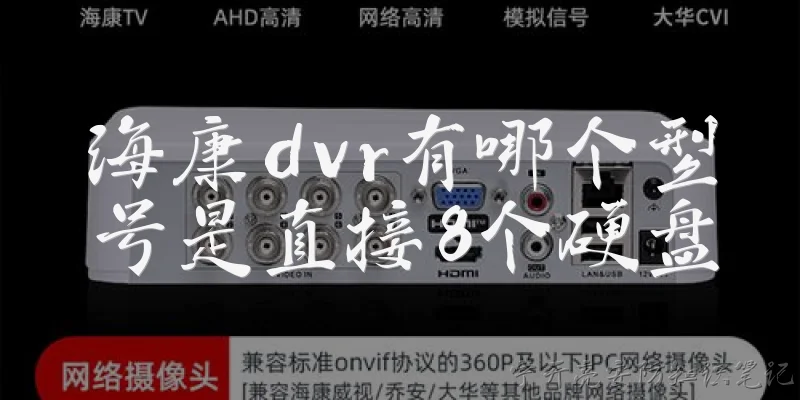
DVR with video input:What is a DVR with video input and how does it differ from a standard DVR?
Q: What is a DVR with video input and how does it differ from a standard DVR?
A: A DVR with video input, often called a standalone DVR or hardware DVR, includes dedicated physical ports (such as BNC, HDMI, or VGA) that allow you to connect analog or digital video sources directly. In contrast, a standard DVR (like a cable box or software-based recorder) typically records only from its internal tuner or a single predefined source. The key difference is flexibility: a DVR with video input can capture footage from security cameras, game consoles, DVD players, or older VCRs. It encodes the incoming signal and stores it on a built-in hard drive. This makes it ideal for surveillance systems or archiving legacy video. Most models support multiple inputs and simultaneous recording, while standard DVRs are limited to one channel or subscription-based content.
Q: What types of video inputs are commonly found on a DVR, and which should I choose for my security camera setup?
A: Common video inputs on a DVR include BNC (for analog CCTV cameras), RCA (composite), HDMI, VGA, and sometimes IP camera inputs via Ethernet. For a traditional analog security camera setup, BNC inputs are standard because they carry composite video over coaxial cable with minimal interference. If you have older cameras with RCA outputs, you can use BNC-to-RCA adapters. For modern IP cameras, you would need a hybrid DVR or NVR that supports both analog and network inputs. When choosing, match the input type to your cameras. Also consider the number of channels (4, 8, 16) and whether the DVR supports 1080p or higher resolution. For most home or small business security, an 8-channel DVR with BNC inputs and H.265 compression offers a good balance of cost, quality, and storage efficiency.
Q: Can I connect a DVR with video input to my computer or TV for live monitoring and playback?
A: Yes, most DVRs with video input offer multiple output options for live monitoring and playback. You can connect the DVR directly to a TV or monitor via HDMI, VGA, or BNC output. For computer access, you typically use the DVR's network port (Ethernet) and log in through a web browser, client software, or mobile app. Some DVRs also support USB for exporting clips or connecting a mouse for on-screen control. If your DVR lacks a direct video output to a computer, you can use a video capture card to convert the DVR's output into a USB signal. However, the simplest method is to use the DVR's built-in network interface. Just assign a static IP, open the required ports, and you can view live feeds and recorded footage remotely from any device on the same network or over the internet.
Q: What are the key factors to consider when buying a DVR with video input for home or small business use?
A: When buying a DVR with video input, focus on these factors: First, input type and channel count—match BNC, RCA, or IP inputs to your cameras, and choose 4, 8, or 16 channels based on coverage. Second, resolution and compression—look for at least 1080p recording and H.265 to save storage. Third, storage capacity—calculate needed hard drive size (e.g., 1TB per 4 cameras for 2 weeks of continuous recording). Fourth, remote access—ensure it supports mobile apps and PC software with P2P or port forwarding. Fifth, playback and search—check for timeline search and event-based recording. Sixth, build quality and warranty—metal cases and 2+ year warranties are better. Finally, budget—entry-level DVRs start around $100, while professional models with advanced analytics cost $300+. Always read reviews for reliability and ease of setup.

Dialogue about
Common scenarios of "DVR with video input"
【Alex】 Hey Jamie, I'm trying to set up a DVR with video input for my home security cameras. Any advice?
【Jamie】 Sure, Alex. What kind of cameras do you have? Analog or IP?
【Alex】 They're analog cameras with BNC connectors. I also want to record from my cable box.
【Jamie】 Got it. So you need a DVR that accepts both analog video inputs and maybe an HDMI or composite input for the cable box.
【Alex】 Right. But most DVRs I see only have BNC inputs for cameras. Can I use a converter?
【Jamie】 Yes, you can use an HDMI to BNC converter, but that might degrade the signal. Alternatively, get a DVR with a built-in video input for cable.
【Alex】 Are there DVRs that have both BNC and HDMI inputs?
【Jamie】 Some hybrid DVRs do. For example, certain models from Hikvision or Dahua have BNC for analog cameras and an HDMI input for a secondary source.
【Alex】 That sounds perfect. Do they also support simultaneous recording from all inputs?
【Jamie】 Typically yes, but check the specs. Some may limit the resolution or frame rate when using the extra input.
【Alex】 Good to know. What about storage? I want to keep at least a week of footage.
【Jamie】 You'll need a large hard drive. Calculate based on number of cameras, resolution, and frame rate. A 2TB drive might give you about a week for 4 cameras at 1080p.
【Alex】 I have 6 cameras. So maybe 4TB?
【Jamie】 Probably. But if you're also recording cable TV, that adds more. Consider a DVR with multiple drive bays.
【Alex】 Any specific models you recommend?
【Jamie】 The Hikvision DS-7208HGHI-F1 is a good budget option. It has 8 BNC inputs and one HDMI input. Or the Dahua XVR5108HS-4KL-X if you need 4K.
【Alex】 Thanks! I'll look into those. One more thing: can I access the DVR remotely?
【Jamie】 Yes, most modern DVRs have network connectivity and mobile apps. Just set up port forwarding or use P2P.
【Alex】 Great. I appreciate the help!
【Jamie】 No problem! Let me know if you need help with the setup.