Hard Drive Car DVR:What is a hard drive car DVR and how does it work?
Q: What is a hard drive car DVR and how does it work?
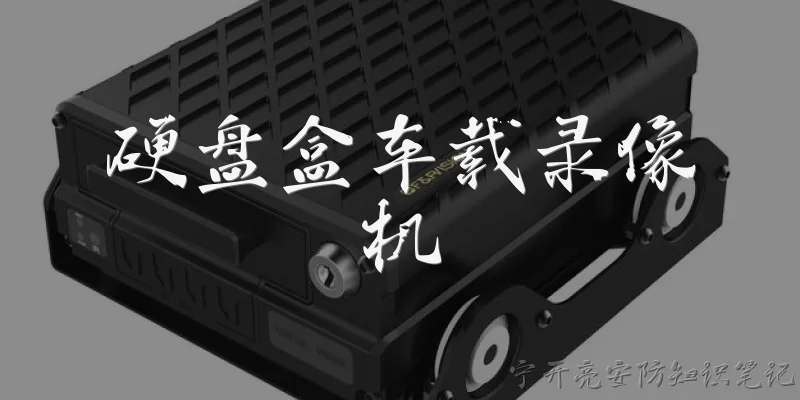
A: A hard drive car DVR is a dashboard camera system that uses a built-in hard disk drive (HDD) for storing video recordings, rather than relying solely on SD cards or cloud storage. Unlike typical dash cams that use small memory cards, a hard drive car DVR can hold a much larger capacity—often 500GB to 2TB—allowing for weeks or even months of continuous loop recording. The system works by capturing video through one or more cameras mounted on the windshield or elsewhere in the vehicle. The footage is then compressed and written directly to the hard drive in a continuous loop, with older files automatically overwritten when space runs low. Many models also include features like GPS tracking, Wi-Fi connectivity, and G-sensor for incident detection. Because hard drives are more susceptible to shock and vibration, these DVRs are usually installed in a secure, shock-absorbed location, such as under the seat or in the trunk. They are popular among fleet operators, rideshare drivers, and anyone needing long-term, high-resolution recording without frequent manual file transfers.
Q: What are the main advantages of using a hard drive car DVR over a standard dash cam?
A: The primary advantage of a hard drive car DVR is its massive storage capacity. While standard dash cams typically max out at 128GB or 256GB via SD cards, a hard drive car DVR can offer 1TB or more, meaning you can record continuous video for weeks without overwriting older footage. This is crucial for commercial drivers, law enforcement, or anyone who wants to retain evidence for longer periods. Another benefit is reliability: hard drives are designed for continuous write cycles, whereas SD cards can wear out faster. Additionally, hard drive car DVRs often support multiple camera inputs (front, rear, interior), allowing comprehensive coverage in a single system. They also tend to have more advanced features like GPS logging, 4G LTE for remote viewing, and parking mode with motion detection. However, they are generally more expensive and require professional installation. For everyday commuters, a standard dash cam may suffice, but for high-mileage or business use, the extra capacity and durability of a hard drive car DVR justify the investment.
Q: How do I choose the right hard drive car DVR for my vehicle?
A: When selecting a hard drive car DVR, consider these key factors: storage capacity, resolution, camera channels, and installation requirements. First, decide on the HDD size—1TB is usually sufficient for about 2-3 weeks of continuous 1080p recording from a single camera. If you need multiple cameras, opt for 2TB or more. Resolution matters for clarity: 1080p is standard, but 4K offers better detail at the cost of larger file sizes. Next, determine how many cameras you need. Basic systems have one front camera, while advanced models support up to four (front, rear, left, right). Check the DVR's operating temperature range; hard drives can fail in extreme heat or cold, so look for models with built-in heating or cooling. Also, consider connectivity: Wi-Fi and 4G LTE let you view footage remotely via a smartphone app. Finally, installation: hard drive car DVRs are typically wired to the vehicle's power and may require professional mounting to avoid vibration damage. Read user reviews for reliability and check warranty terms. Brands like BlackVue, Thinkware, and Kenwood offer reputable hard drive-based options, but always verify compatibility with your vehicle's electrical system.
Words of experience
Common scenarios of "Hard Drive Car DVR"
【Car Owner】 Hey, I've been thinking about getting a dash cam for my car. I heard about hard drive car DVRs. What exactly are they?
【Tech Enthusiast】 A hard drive car DVR is a dashboard camera that uses a built-in hard disk drive for storage instead of SD cards. It can record continuously for days without overwriting, which is great for long trips or fleet management.
【Car Owner】 That sounds useful. How does it compare to a regular SD card dash cam?
【Tech Enthusiast】 The main advantage is storage capacity. A typical SD card might hold 32-128GB, while a hard drive DVR can have 500GB to 2TB. That means you can record weeks of footage before looping. Also, hard drives are more durable for constant writing, but they're more susceptible to physical shock.
【Car Owner】 I see. Are there any downsides? Like, do they need special installation?
【Tech Enthusiast】 Yes, they're usually larger and heavier, so they mount differently. Some are integrated into a rearview mirror. Installation might require hiding wires and possibly connecting to the car's power system. Also, hard drives can fail if exposed to extreme temperatures, so you need a model with good heat resistance.
【Car Owner】 What about video quality? Do they record in 4K?
【Tech Enthusiast】 Many high-end hard drive DVRs support 4K or even dual-channel recording (front and rear). But keep in mind that higher resolution means larger files, which can fill up the hard drive faster. A 1TB drive might hold about 200 hours of 1080p footage, but only 50 hours at 4K.
【Car Owner】 That's still a lot. How do I access the footage? Can I view it on my phone?
【Tech Enthusiast】 Most come with Wi-Fi and a mobile app. You can connect to the DVR's hotspot and stream or download videos. Some also have a small screen for immediate playback. For hard drive models, you can also remove the drive and connect it to a computer, but that's less convenient.
【Car Owner】 Are there any brands you recommend?
【Tech Enthusiast】 Brands like BlackVue, Thinkware, and Viofo offer hard drive options, but they're often external. For integrated hard drive DVRs, look at specialized fleet cameras like those from Streamax or Howen. It depends on your budget and needs.
【Car Owner】 I mostly drive for personal use, but I want something reliable. What features should I prioritize?
【Tech Enthusiast】 For personal use, prioritize parking mode with buffered recording, GPS for speed and location, and good night vision. Also, ensure it has a capacitor instead of a battery for better heat tolerance. Hard drive models often have these, but check reviews for reliability.
【Car Owner】 Parking mode? How does that work with a hard drive DVR?
【Tech Enthusiast】 Parking mode uses motion detection or impact sensors to start recording when someone hits your car or moves nearby. With a hard drive, you can record for much longer without overwriting, so you're more likely to capture incidents. But it needs a constant power source, like a hardwired kit or a separate battery pack.
【Car Owner】 Won't that drain my car battery?
【Tech Enthusiast】 Yes, if not managed properly. Many DVRs have a voltage cutoff that turns off recording when the battery drops below a certain level. You can also use a dedicated dash cam battery like Cellink Neo to power it without draining your car's battery.
【Car Owner】 That's good to know. What about the size of the hard drive? Is 500GB enough?
【Tech Enthusiast】 500GB is decent for 1080p recording—about 100 hours. If you want 4K or dual-channel, go for 1TB or more. Also, consider whether the hard drive is user-replaceable. Some models allow you to swap drives, which is handy.
【Car Owner】 Can I use an external hard drive with a regular dash cam?
【Tech Enthusiast】 Some dash cams support external USB drives, but they may not be designed for the vibration and temperature extremes in a car. A dedicated hard drive DVR is better because it's built to handle those conditions. However, you could use a portable SSD, which is more shock-resistant than a spinning hard drive.
【Car Owner】 SSD? That might be a good compromise. Are there dash cams that support SSDs?
【Tech Enthusiast】 Yes, some high-end models like the BlackVue DR900X Plus can use a USB SSD. SSDs are faster, more durable, and silent. But they're more expensive per GB. If you want the best of both worlds, an SSD-based DVR is a solid choice.
【Car Owner】 I'll consider that. What about installation? Can I do it myself?
【Tech Enthusiast】 If you're handy, yes. You'll need to mount the DVR, route the power cable to the fuse box or 12V outlet, and possibly connect a rear camera. Hardwiring for parking mode is trickier—you might need a fuse tap. If unsure, hire a professional.
【Car Owner】 Any legal issues I should be aware of?
【Tech Enthusiast】 Laws vary by state and country. In some places, you can't mount anything on the windshield that obstructs the driver's view. Also, recording audio may be illegal without consent. Check local regulations. Generally, dash cams are legal for personal use.
【Car Owner】 Thanks for all the info. I think I'll look for a hard drive DVR with SSD support and parking mode.
【Tech Enthusiast】 Great choice! Just make sure to read reviews and compare features. Also, consider a model with cloud upload if you want remote access. Let me know if you have more questions.