Store Monitoring and Inspection System:What is a Store Monitoring and Inspection System?
Q: What is a Store Monitoring and Inspection System?
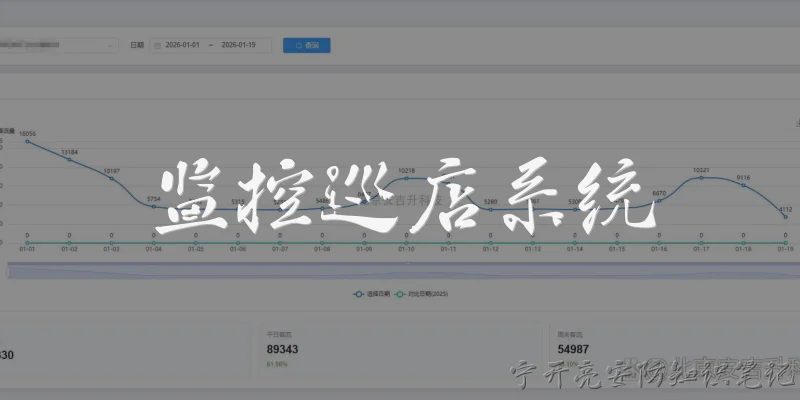
A: A Store Monitoring and Inspection System is a comprehensive digital platform designed to help businesses oversee the compliance, safety, and operational standards of their retail locations or storage facilities. It combines hardware such as cameras and IoT sensors with software that automates data collection, reporting, and alerts. Key features include real-time video surveillance, environmental monitoring (temperature, humidity), inventory checks, and task management for inspections. The system enables managers to remotely audit stores, identify issues like expired products or safety hazards, and ensure adherence to company policies and regulatory requirements. By centralizing all inspection data, it reduces manual paperwork, speeds up corrective actions, and provides actionable insights through dashboards and analytics, ultimately improving efficiency and reducing risks across multiple locations.
Q: How does a Store Monitoring and Inspection System improve operational efficiency?
A: A Store Monitoring and Inspection System streamlines operations by automating routine checks and centralizing data. Instead of manual walkthroughs and paper checklists, inspectors use mobile apps or fixed sensors to capture real-time conditions. The system instantly flags anomalies—like temperature deviations in refrigerated units or blocked emergency exits—and routes alerts to the right personnel. This reduces downtime and prevents small issues from becoming costly problems. Additionally, analytics dashboards highlight trends, such as frequent stockouts in certain aisles, enabling proactive replenishment. Managers can schedule inspections, assign tasks, and track completion rates, ensuring accountability. The elimination of paperwork and manual data entry saves hours per week, while standardized digital forms ensure consistency across all stores. Overall, the system boosts productivity, lowers operational costs, and allows staff to focus on customer service rather than administrative burdens.
Q: What key features should a Store Monitoring and Inspection System include?
A: A robust Store Monitoring and Inspection System should offer several essential features. First, real-time monitoring via CCTV, IoT sensors, or RFID for tracking inventory, temperature, and foot traffic. Second, mobile inspection apps with customizable checklists, photo capture, and barcode scanning for on-site audits. Third, automated alerts and notifications for deviations, such as expired products or safety violations. Fourth, a centralized dashboard for viewing all locations, generating reports, and analyzing trends. Fifth, task management to assign corrective actions, set deadlines, and track resolution. Sixth, integration with existing ERP, POS, or facility management systems for seamless data flow. Seventh, compliance management to ensure adherence to health, safety, and industry regulations, with audit trails. Finally, role-based access control and data encryption for security. These features together provide a complete solution for maintaining high standards across retail or storage networks.
Q: What are the benefits of using a Store Monitoring and Inspection System for multi-location businesses?
A: For multi-location businesses, a Store Monitoring and Inspection System delivers significant benefits. It provides a unified view of all stores, enabling head office to compare performance, identify underperforming sites, and share best practices. Consistency in inspections ensures every location meets the same quality and safety standards, reducing brand risk. Remote monitoring cuts travel costs and time for area managers, who can conduct virtual audits and address issues instantly. The system also improves compliance with local regulations by automatically updating checklists and generating audit-ready reports. Faster response to incidents—like equipment failures or security breaches—minimizes operational disruption. Additionally, data analytics help optimize staffing, inventory, and energy usage across the chain. Ultimately, the system scales easily, supports rapid expansion, and provides a competitive edge by maintaining high operational excellence and customer satisfaction at every location.
Words of experience
Common scenarios of "Store Monitoring and Inspection System"
【Store Manager】 Good morning, team. I've called this meeting to discuss the implementation of our new Store Monitoring and Inspection System. As you know, we've been facing challenges with consistency and efficiency in our store inspections. This system aims to streamline the process and provide real-time data. I'd like to hear your thoughts and any concerns.
【IT Specialist】 Thanks for organizing this. From a technical perspective, the system will require reliable internet connectivity in all stores and devices for inspectors. We'll need to ensure all stores have updated hardware and software. Also, data security and privacy are critical, so we'll implement encryption and access controls. I can provide a detailed technical requirements document by next week.
【Regional Inspector】 I'm excited about the potential improvements. Currently, we use paper checklists and then manually enter data, which is time-consuming and error-prone. With this system, we can complete inspections on tablets and sync data instantly. However, I'm concerned about the learning curve for some of our older inspectors. We'll need comprehensive training and support.
【Store Manager】 Good points. Training is indeed crucial. We'll allocate budget for training sessions and maybe create a user-friendly guide. Also, we should consider a phased rollout to iron out issues. What about the inspection criteria? Will they be standardized across all regions?
【Compliance Officer】 Standardization is key for compliance. We need to ensure that all inspections cover the same core areas: cleanliness, safety, product placement, customer service, etc. The system should allow for customizable checklists based on store type, but with mandatory items. I can work with the regional inspectors to develop a standardized template.
【IT Specialist】 The system can support dynamic checklists. We can have a master template with mandatory items and optional ones that regions can add. The backend will be flexible. Also, we can integrate with existing inventory and sales systems to provide context during inspections.
【Regional Inspector】 That integration would be helpful. For example, if a store has low sales, we can check if it's due to poor product placement. But we need to be careful not to overload inspectors with too much data. Keep it simple and focused on actionable insights.
【Store Manager】 Agreed. Let's prioritize the core functionalities first. Now, about the reporting: what kind of reports will the system generate? We need to track trends, identify common issues, and measure improvement over time.
【IT Specialist】 The system will have a dashboard for real-time metrics, and we can generate periodic reports in PDF or Excel. We can also set up alerts for critical issues. The data can be sliced by region, store, inspector, etc. We'll work with you to define the KPIs.
【Compliance Officer】 I'd like to add that the system should also capture photos and notes as evidence. That will help in audits and follow-ups. Also, we need to ensure data retention policies comply with legal requirements.
【Store Manager】 Yes, photo evidence is a great feature. Let's make sure it's easy to attach photos to specific checklist items. Now, what about the timeline? How long will it take to develop and deploy?
【IT Specialist】 If we start now, we can have a prototype in two months, then pilot in three stores for a month, and full rollout in six months. But that depends on resource availability and feedback from the pilot.
【Regional Inspector】 Six months seems reasonable. But we should also plan for ongoing maintenance and updates. The system should evolve with our needs. Can we have a feedback mechanism within the system for inspectors to suggest improvements?
【IT Specialist】 Absolutely. We can include a feedback form or a ticketing system. Also, we'll schedule regular reviews with stakeholders to prioritize enhancements.
【Store Manager】 Great. Let's also think about incentives. How can we encourage inspectors to adopt the system and use it effectively? Maybe tie it to performance reviews or recognition programs.
【Compliance Officer】 That's a good idea. We can highlight the benefits: less paperwork, faster reporting, and better insights. Also, we can showcase success stories from early adopters.
【Regional Inspector】 I can help with that. I'll volunteer my region for the pilot. I'll also communicate with my team to address any resistance and gather feedback.
【Store Manager】 Excellent. So, to summarize: IT will provide technical requirements and develop the system; Compliance will standardize checklists; Regional Inspectors will participate in pilot and provide feedback; and we'll all work on training and communication. Let's reconvene in two weeks with a project plan. Any other questions?
【IT Specialist】 Just one: we need to decide on the platform. Should it be a web app, mobile app, or both? I recommend both for flexibility, but that might increase development time.
【Store Manager】 Let's go with both, but prioritize the mobile app for inspectors. We can start with a basic web version for managers. We'll discuss the details in the project plan. Meeting adjourned. Thank you, everyone.